

An email arrives saying your domain is about to expire, your website has a security issue, or your account needs urgent verification. It looks familiar, sounds technical and asks you to act quickly.
I recently received an email claiming to be from a company whose services I use. Instead of following the link, I contacted the company directly. They confirmed it was phishing. It prompted me to put together this guide, particularly for business owners managing websites, domains and online stores.
What is phishing?
Scamwatch, part of the Australian Competition and Consumer Commission, explains:
“Phishing is when scammers impersonate trusted people or organisations to deceive you into providing personal information.”
For website owners, that could mean someone pretending to be your domain registrar, website or email hosting company, a platform such as Squarespace or Shopify, or your web designer (a personal impersonation attempt).
Their aim most likely financial (payment) but could also be to obtain your login details and cause harm to your website.
What should raise an alarm?
Some messages look professional and include your name, website address and familiar branding. Good spelling and a recognisable logo do not make a message genuine.
Look more closely when an email includes:
Pressure to act immediately, particularly threats to suspend or delete your website.
Unexpected requests for access, passwords or verification codes.
Payment changes, such as a new bank account, an unfamiliar payment service or a different currency.
Instructions to download software or allow remote access to resolve a supposed issue.
Technical claims about urgent repairs that you have not previously discussed with your provider.
These are reasons to pause and check. You do not need to understand all the technical language to question an unexpected request.
Check the address behind the name
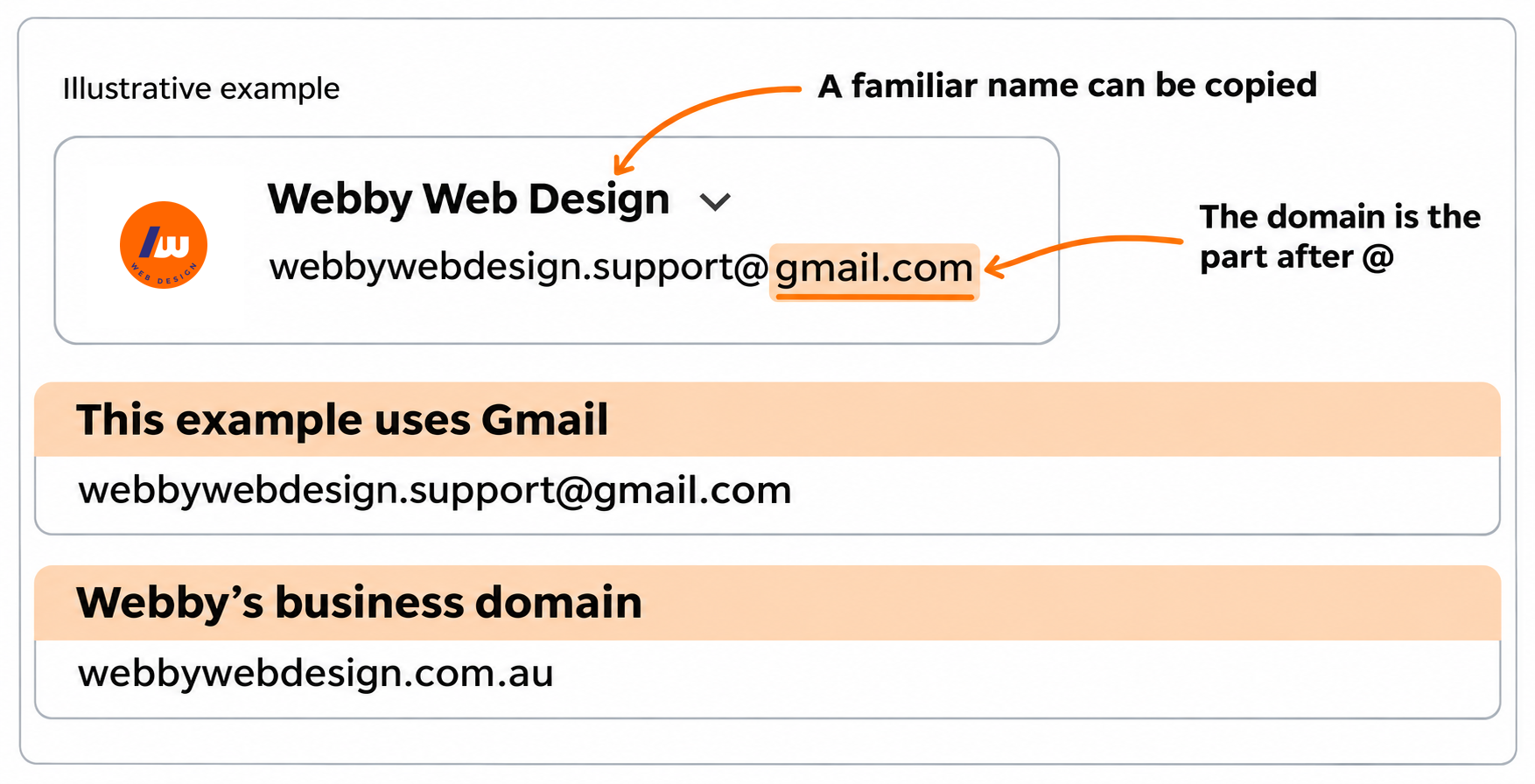
The sender’s display name can say anything. “Squarespace Support” or your web designer’s name does not establish who sent the message.
Click or tap the sender’s name or the small arrow beside it to reveal the full email address. The exact steps depend on your email app.
Look at the part after the @ symbol. For example, in name@webbywebdesign.com.au.com.au, the email domain is webbywebdesign.com.au.
Compare the sender’s email domain with previous genuine correspondence and the company’s official website. Look for extra letters, misspellings or an unrelated domain.
Scammers can easily create a free Gmail account with a familiar business name before the @ symbol. For example, webbywebdesign.support@gmail.com might look convincing at a glance, but its domain is gmail.com, not webbywebdesign.com.au.
A Gmail address does not automatically mean an email is a scam as many businesses legitimately use Gmail. However, if a company normally uses its own domain and suddenly contacts you from Gmail, pause and verify the request.
Some companies use several legitimate sending domains, and sender addresses can also be imitated. Checking the address is a useful first step, but if you are unsure, contact the business using details you already trust.
Verify the request separately
Avoid replying to the suspicious email or using its links, phone numbers or signature details.
Instead, open your usual bookmark or app, type the website address yourself, or call a number you already know is genuine. If emailing, start a new message using a previously verified address.
For website access: check the users or permissions section of your account. If your developer regularly maintains your website and already has the necessary access, an unexpected request to add a new administrator deserves checking.
There can be genuine reasons to renew access. Shopify, for example, expires collaborator access after 90 days without a login. Verify the person separately, then review the request or existing account inside your Shopify admin. An access request appearing in the dashboard does not, by itself, prove the requester is someone you trust.
For payments: call your provider before using changed bank details or an unfamiliar payment method. This is worth doing even when the invoice looks familiar.
Report it, then block the sender
Once you have identified a phishing email, use your email app’s reporting option rather than only deleting it.
In Outlook for example, select the message, then choose Report → Report phishing. Other versions may place this under the Junk menu or a reporting add-in.
Reporting and blocking are separate actions. Use Block sender as well if available. Blocking can filter further messages from that address, but scammers may switch to another one. Reporting helps your email provider investigate and improve protection.
Let the impersonated business know through its genuine contact channel. I am grateful to my clients who have alerted me to emails pretending to be from Webby. Your messages have allowed me to take immediate action, report the fake accounts and warn other clients. You can also report the scam to Scamwatch.
What if you have already responded?
Please do not feel embarrassed or put off asking for help. These messages are designed to take advantage of trust.
Stop communicating with the sender. What you do next depends on what you shared or allowed:
Entered a password: change it through the genuine website or app, and change it anywhere else you reused it.
Granted website access: contact the platform’s official support and your genuine developer promptly to review and remove unauthorised access.
Paid money or shared banking details: contact your bank immediately.
Downloaded or installed something: contact your IT support provider and run a security scan.
Clicked a link without entering anything: close the page and avoid further interaction. If anything downloaded or you notice unusual activity, seek IT advice.
Cybercrime involving financial loss, stolen information or unauthorised access can also be reported through ReportCyber.
A note for Webby clients
Webby Web Design has also been impersonated in emails to clients, and other web designers have reported similar experiences.
I use my @webbywebdesign.com.au business email for client correspondence, never a Gmail address.
If you receive an unexpected request that appears to come from me, particularly about payment or website access, please check with me using my usual contact details.
You are always welcome to ask. I would much rather spend a moment checking an email with you than have you feel pressured to act on it.