Adding your Podcast to your website: tips and examples
Podcasts are becoming extremely popular especially with many personal brand type businesses.
There are many podcasting platforms that you can use to host your podcast - once you select a podcast platform, it is best to incorporate and integrate the podcast to your website - this is more than just a link to your podcast.

Why it is important?
It shows your visitors a glimpse of your podcast
Encourages subscribers
Showcases your content and establish your authority in your field
Helps with site SEO with regular content added
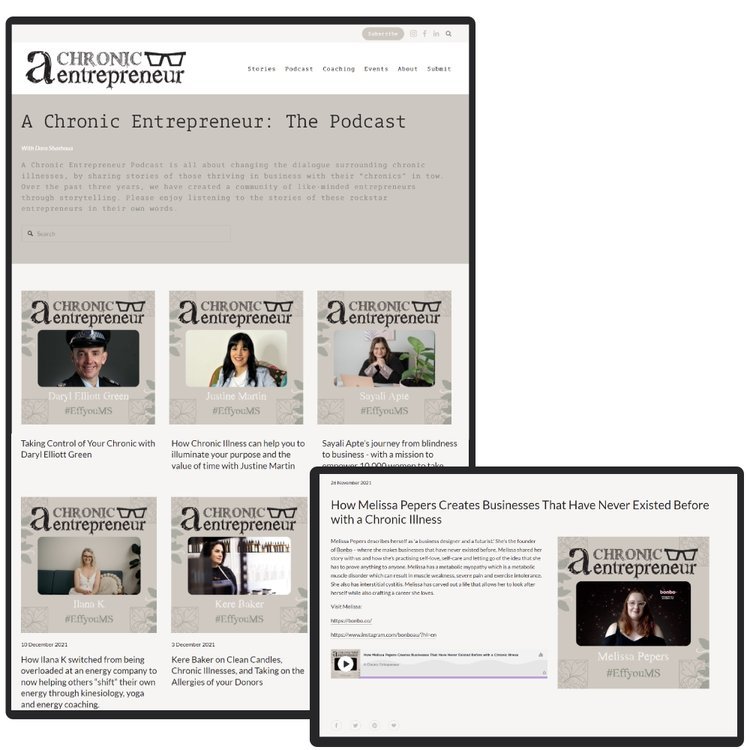
The best way to set this up is in a blog format and include the following for each episode:
Title
Published Date
Brief description
Image of the guest or topic discussed
Embedded audio file form your podcast or link to listen.
In addition create a landing page or a header on the podcast page with an overview of the podcast and a link to subscribe.
How to display your podcast on your website?
Add a dedicated podcast page to your menu / footer
Add a feed or a promotion from home page
Once your podcast is set up on your website it is best to promote each episode to bring traffic to the page and audience:
Post on social media
Send a newsletter (can be an automated RSS feed)
Examples for podcast pages developed by Webby (on Squarespace)